See Pay First: UK Social Media Jobs Newsletter with Daily Alerts

Subscribe to a curated, salary-transparent social media jobs newsletter and set daily alerts for the roles you actually want. That single move cuts wasted time on underpaid postings and puts you ahead of the applicant pool the moment a job goes live. Curated sources like Sam's Social Media Club show pay upfront, so you spend your energy applying instead of guessing what a role is worth.
TL;DR:
- Choosing curated, salary-transparent newsletters ensures every listing has a pay range, reducing time wasted on roles that do not meet your minimum salary needs.
- Subscribing to daily alerts for active roles provides a first-mover advantage, increasing your chances of being reviewed before the inbox becomes overwhelmed.
- Limiting subscriptions to two or three high-signal sources with clear salary information improves search efficiency over volume-heavy, less-filtered feeds.
- Skipping newsletters that frequently omit pay ranges or direct apply links prevents wasted effort on unreliable or volume-driven alerts.
- Regularly reviewing sample issues helps verify that a newsletter maintains quality, transparency, and consistent scheduling, ensuring it remains a trustworthy resource.
Get salary-transparent roles in your inbox. The free SSMC newsletter sends hand-picked social media, content, marketing and communications jobs, with the salary on every one. Sign up free
Table of Contents
- Types of email job updates you'll encounter
- How to choose which newsletters and alerts to subscribe to
- How to set and optimise your alerts for speed
- Why curation and salary transparency shorten your search
- Using newsletters for more than just job listings
- What most job-search advice gets wrong
- Join Sam's Social Media Club and see salary-transparent roles first
- Tools and benchmarks worth bookmarking
- Sources
- FAQ
Types of email job updates you'll encounter
Not every job email is built the same way, and knowing the difference saves you from drowning in irrelevant alerts.
- Curated newsletters: an editor reviews and selects roles, often adding salary ranges and context you won't find on a raw job board.
- Job-board saved-search alerts: automated feeds that match your keywords to new postings, useful for volume but light on filtering for quality or pay.
- Employer talent networks: sign-ups run by individual companies that notify you when a role opens on their own team, good for targeting a shortlist of employers you already admire.
- Weekly digests: a rolled-up summary of the week's postings, better suited to passive job seekers than to anyone applying urgently.
Curated newsletters tend to win on signal because a person, not just an algorithm, has decided the listing is worth your time. Job-board alerts win on volume, which matters if you're casting a wide net early in a search. The practical way to tell a genuinely curated, salary-transparent issue from a repackaged job-board feed is to check whether every listing shows a pay range and a direct link to apply. If half the postings say "competitive salary," you're looking at a volume feed wearing a newsletter's clothing.
How to choose which newsletters and alerts to subscribe to
Subscribing to everything defeats the purpose. A handful of high-signal sources beats twenty noisy ones.
- Set role and platform keywords: use exact phrases like "senior social media manager," "paid social specialist," or "content creator (video-first)" alongside platform tags such as TikTok, LinkedIn, or Meta.
- Add seniority markers: terms like "junior," "lead," or "head of" narrow results fast and stop you from wading through mismatched levels.
- Prioritise salary transparency: favour sources that publish a pay range on every listing, since that's the fastest way to filter out roles below your minimum.
- Check a sample issue before subscribing: look for direct apply links, consistent frequency, and evidence the source actually curates rather than auto-aggregates.
- Look for trust signals: a long-running archive and a named editor suggest a newsletter has a track record worth your inbox space.
Salary transparency matters because it removes the single biggest time sink in a job search: applying, interviewing, and only then discovering the pay doesn't work for you. Sam's Social Media Club has written about why pay transparency for social media and marketing jobs speeds up hiring for both sides, and the same logic applies to your search.
Pro Tip: Skim three back issues of any newsletter before subscribing. If fewer than half the listings show a salary range, it's a volume feed, not a curated one.
How to set and optimise your alerts for speed
Getting the format right matters less than getting the frequency and follow-through right.
- Choose daily alerts for active searches: daily beats weekly for roles you're serious about because first-mover applications tend to get more attention before a role is buried under a stack of hundreds.
- Reserve weekly digests for market watching: use these for roles you're curious about but not actively pursuing, so your inbox stays manageable.
- Build saved searches with exact keywords: platforms like NHS Jobs let you save a search and choose daily or weekly email alerts directly from a saved-searches dashboard, a pattern most job boards now follow.
- Use official update tools where relevant: GOV.UK offers email updates for topics, departments, and some specific pages, a useful model for anyone tracking public-sector communications roles.
- Build a rapid-response kit: one tailored CV, two short cover-note templates, and a simple tracking sheet with application dates and follow-up reminders.
First-mover advantage is real: daily alerts beat weekly ones for active roles because early applicants are more likely to be reviewed before a hiring manager's inbox fills up. Set daily frequency on your top three to five target searches, and downgrade everything else to weekly so you're not triaging fifty emails before breakfast.
Why curation and salary transparency shorten your search
A curated list works because someone has already done the filtering you'd otherwise do yourself, role by role, across a dozen tabs. Sam built Sam's Social Media Club around one frustration: too many talented social media professionals were spending hours applying to roles that turned out to pay far less than expected once an offer arrived. Curation means every listing passes a quality check before it reaches a subscriber's inbox, and mandatory salary ranges mean you know the number before you write a single word of your application.
- Every listing on Sam's Social Media Club carries a salary range, no exceptions.
- Apply links go straight to the employer, removing an extra click between alert and application.
Salary transparency isn't a nice extra. It's the fastest filter a job seeker has.
The quickest way to judge any newsletter, including ours, is to pull up a recent issue and check three things: does every job show a pay range, does the apply link go straight to the employer, and does the frequency match what you were promised at sign-up.
Using newsletters for more than just job listings
A good newsletter does more than list openings. Curated social media job newsletters often include short notes on hiring trends, which platforms are investing in social teams, and which skills are showing up across multiple postings in a given month. That context helps you tailor a CV before you've even seen a specific role, because you already know that platform specialism and data literacy are showing up repeatedly across social media hiring right now.

Some issues also flag talent networks and employer sign-ups worth joining directly, effectively pointing you toward a second layer of alerts beyond the newsletter itself. Reading a newsletter regularly, even when you're not actively applying, builds a working knowledge of who's hiring, what they're paying, and how the market is shifting. That's harder to pick up from a single job-board search than from a source you read every week. Over time, this turns a newsletter from a list of vacancies into a low-effort way to stay current on an industry that moves quickly, which matters if your next move isn't urgent but you want to be ready when it is.
What most job-search advice gets wrong

Most job-search advice treats every alert as equally useful and tells readers to "cast a wide net." That's backwards. A wide net catches volume, and volume is exactly what buries a serious job seeker in noise until they stop opening the emails altogether. The better approach is fewer, sharper sources: one or two curated, salary-transparent newsletters and a tight set of saved searches with real keywords, not generic titles.
The other blind spot is treating salary transparency as a nice-to-have rather than a filter. If a listing hides the number, that's information too. Readers should prioritise sources that publish pay upfront, apply fast to the roles that clear their bar, and stop treating every notification as worth a full application. Speed matters, but only once you've already filtered out the roles that were never going to work.
— Sam
Join Sam's Social Media Club and see salary-transparent roles first
The free SSMC newsletter sends hand-picked social media, content, marketing, and communications roles straight to your inbox every week, with a pay range on every listing and direct links to apply, so you never invest time in an application before you know the number.
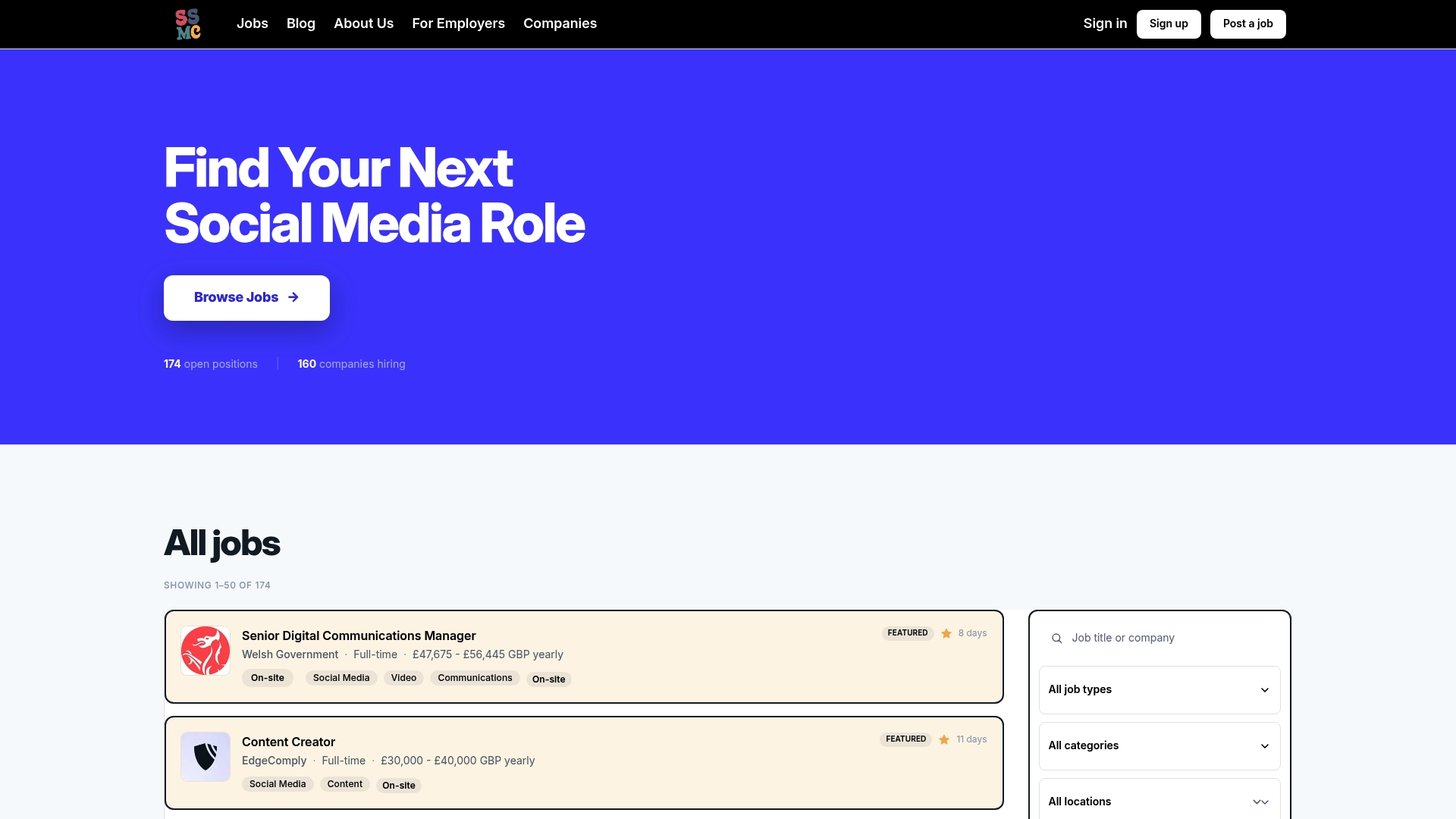
- Curated roles across social media, content, marketing, and communications.
- Mandatory salary ranges on every listing.
- Direct apply links straight to the employer.
| What you get | What it doesn't guarantee |
|---|---|
| Salary-transparent listings | A guaranteed interview |
| Curated role selection | A specific response time from employers |
| Direct apply access | A match for every skill set |
Sign up to the free newsletter to start receiving listings, or browse every open role now. If you're an employer, see listing options or send an enquiry to understand how listings get selected.
Tools and benchmarks worth bookmarking
- GOV.UK email updates for tracking public-sector roles and official announcements by topic or department.
- NHS Jobs saved-search alerts as a working example of daily versus weekly alert settings.
- Digital Waffle's 2026 UK social media salary guide for benchmarking pay before you apply.
- SSMC's UK pay data for social media and marketing roles.
Sources
- Applicant - How do I set up email alerts in the NHS Jobs service? · Customer Self-Service
- Get emails about updates to GOV.UK
- 2026 UK Social Media Salary Guide | Digital Waffle
FAQ
How often should I check a social media jobs newsletter?
Set daily alerts for the two or three roles you're actively chasing, and let everything else sit in a weekly digest. Daily alerts give you a first-mover advantage on postings that fill quickly, while weekly digests are enough for general market awareness.
Are curated, salary-transparent newsletters free to join?
Most curated newsletters, including Sam's Social Media Club's, are free for job seekers because employers pay to list roles. You get access to salary-transparent postings at no cost, while hiring teams fund the platform through paid listings.
How many job alert newsletters should I subscribe to?
Two or three well-chosen sources usually beat a dozen generic ones. Focus on newsletters that show salary ranges and direct apply links, and unsubscribe from anything that turns into noise within a few issues.
How do I know if a social media jobs newsletter is legitimate?
Check a sample issue for consistent salary ranges, direct links to the employer's own application page, and a visible archive or named editor. A legitimate source keeps a steady schedule and never asks you to pay for access to listings.
What keywords should I use to filter my alerts?
Use specific role phrases like "paid social specialist" or "senior social media manager" alongside platform tags such as TikTok, LinkedIn, or Meta. Adding seniority markers and platform names narrows results and cuts down on irrelevant matches.